The "Item Switch" (or Bait-and-Switch) is one of the oldest scams in the book, dating back to the earliest days of MMO trading. Despite the introduction of trade holds and Mobile Authenticators, it remains a surprisingly effective way for scammers to steal valuable CS2 skins, relying entirely on human error and distraction rather than complex hacking.
If you engage in manual, peer-to-peer trading (trading directly with another user via the Steam trade window), you must be hyper-aware of this tactic.
The Psychology of the Scam
The Item Switch does not rely on bypassing Steam's security. It relies on bypassing your attention. Scammers know that when users are negotiating a high-value trade, adrenaline and excitement often cloud judgment. They use social engineering to distract you at the critical moment of confirmation.
How the Item Switch Happens
Step 1: The Lure (The Bait)
The scammer approaches you with an incredibly fair or even profitable trade offer. For example, they might offer a Factory New AK-47 Bloodsport (worth ~$100) for your Field-Tested M4A4 Asiimov (worth ~$80). The deal is good enough to excite you, but not so insanely good that it immediately screams "scam" to an inexperienced trader.
Step 2: The Setup
You both enter a live Steam trade session. The scammer places the Factory New Bloodsport in the window. You place your Asiimov. Everything looks perfect. You are ready to click "Ready to Trade."
Step 3: The Distraction
Right as you are about to confirm, the scammer starts talking rapidly in the trade chat or Discord.
- "Wait, can you add a small sweet?"
- "Hold on, let me check the float value of your M4."
- "My friend says I'm overpaying, can you add $5?"
They might even repeatedly click the "Ready" checkbox on and off to create a flashing, confusing visual environment in the trade window.
Step 4: The Switch
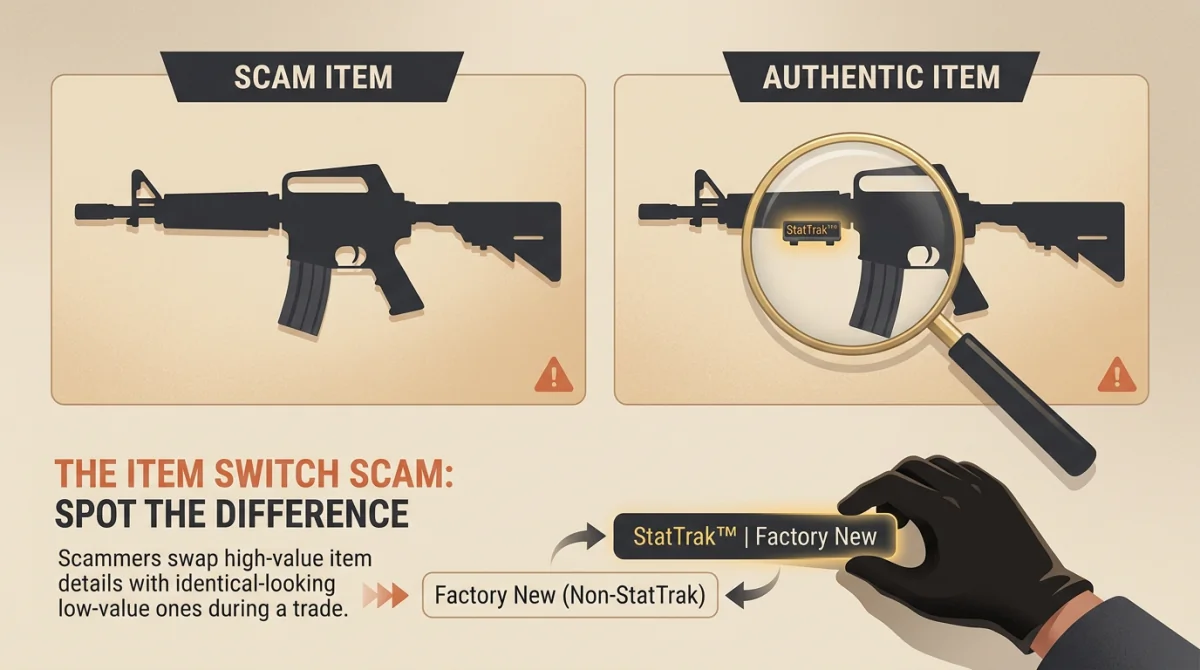
While you are looking at the chat window to respond to their distraction, they execute the switch. They quickly remove the Factory New Bloodsport and replace it with a nearly identical item.
Common switches include:
- The Wear Switch: Swapping a Factory New item for a Battle-Scarred version of the exact same skin. The icon looks very similar, but the value drops by 90%.
- The Lookalike Switch: Swapping an expensive skin for a cheaper skin that has a similar color palette or icon outline.
- The StatTrak Switch: Swapping a non-StatTrak version for a StatTrak version (if they are trying to steal your StatTrak item) or vice versa.
- The Empty Window: Sometimes, they just remove their item entirely, hoping you just click "Accept" to give your item away for nothing.
Step 5: The Rushed Confirmation
Immediately after making the switch, they click "Ready to Trade." Because you have already mentally agreed to the trade and are eager to finish the profitable deal, you might quickly click "Ready" and then "Accept" without re-evaluating their side of the window.
If you don't catch the switch in the desktop window, your last chance is the Mobile Authenticator. But if you are still rushed, you might just blindly confirm it on your phone as well.
How to Defeat the Item Switch
Defeating this scam requires discipline and a refusal to be rushed.
- Never Trade While Distracted: If you are watching a video, playing a match, or talking to someone else, do not execute a high-value trade.
- Ignore the Chat at the End: Once items are in the window, stop reading the chat. Focus entirely on the items. If they want to renegotiate, cancel the trade and start over.
- The "Hover" Rule: Before you click the final "Ready to Trade" box on your PC, hover your mouse over their item one last time. Read the tooltip pop-up. Verify the Name, the Wear (Exterior), and the StatTrak/Souvenir status.
- The Mobile Authenticator Check: The Steam app is your ultimate safety net. When the confirmation pops up on your phone, read it carefully. Do not just look at the pictures. Read the text description of the item you are receiving. Ensure it says "Factory New" and not "Battle-Scarred".
- Use Trade Offers Instead of Live Sessions: Live trade sessions are designed for real-time negotiation, which invites distraction. Whenever possible, use offline "Trade Offers" (sending a trade via their Trade URL). This allows you to review the trade asynchronously, without the scammer talking to you, removing the element of pressure.
The Item Switch is a magic trick; it only works if you look where the magician wants you to look. By keeping your eyes locked on the final item details, the trick falls apart entirely.