Free Case Clickers Without the House Edge
CS2 case clickers and online unboxing simulators exist because the unlock animation is addictive—and a real Steam key is not free. The problem is that a huge chunk of the market still sells “simulators” that behave like grey-area casinos: odds you cannot audit, luck that shifts after you deposit, and fees that only appear when you try to leave.
take.skin's CS2 Case Opening Simulator is built the other way: official Valve-style drop rates, completely free opens, no hidden fees, and a case library large enough that you can practice on the same boxes people actually talk about. Every day, case-opening fans worldwide run hundreds of thousands of simulated opens here.
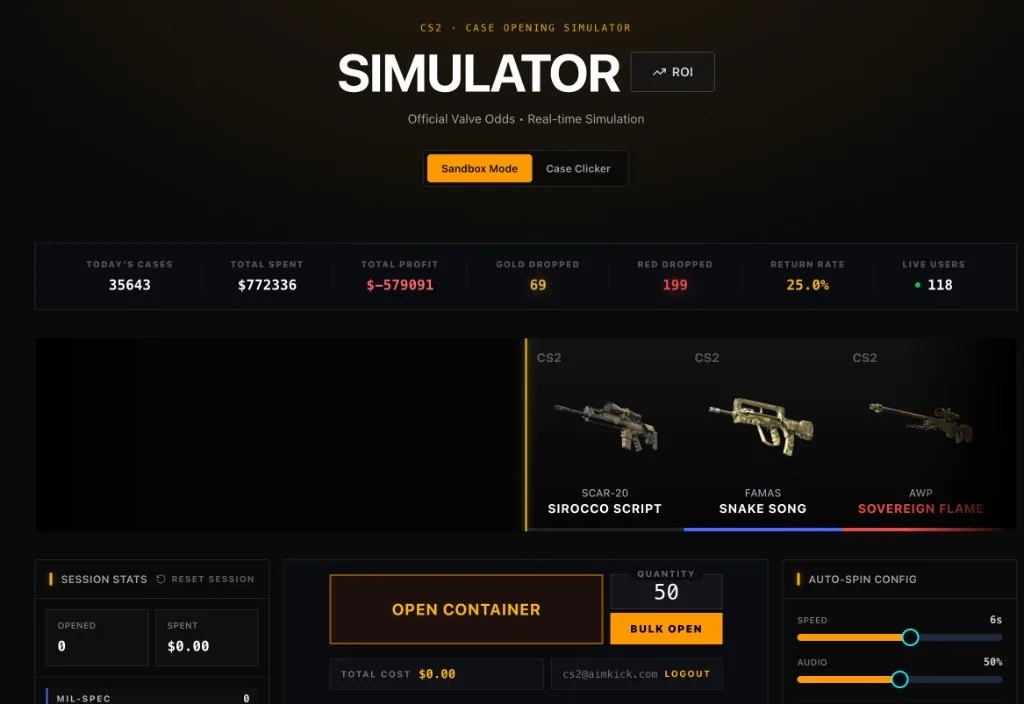
The UI above is the real product: Sandbox Mode or Case Clicker, live community stats (opens, gold/red counts, return rate), single open or bulk quantity, and session tracking—still $0.00 to spin.
Every Weapon Case You Can Simulate on take.skin
This is the part most generic “case clicker” articles skip. take.skin does not limit you to one fake box. You pick from a full grid of real CS2 / CS:GO weapon cases (plus select collections), each showing item count and live market case price for ROI context.
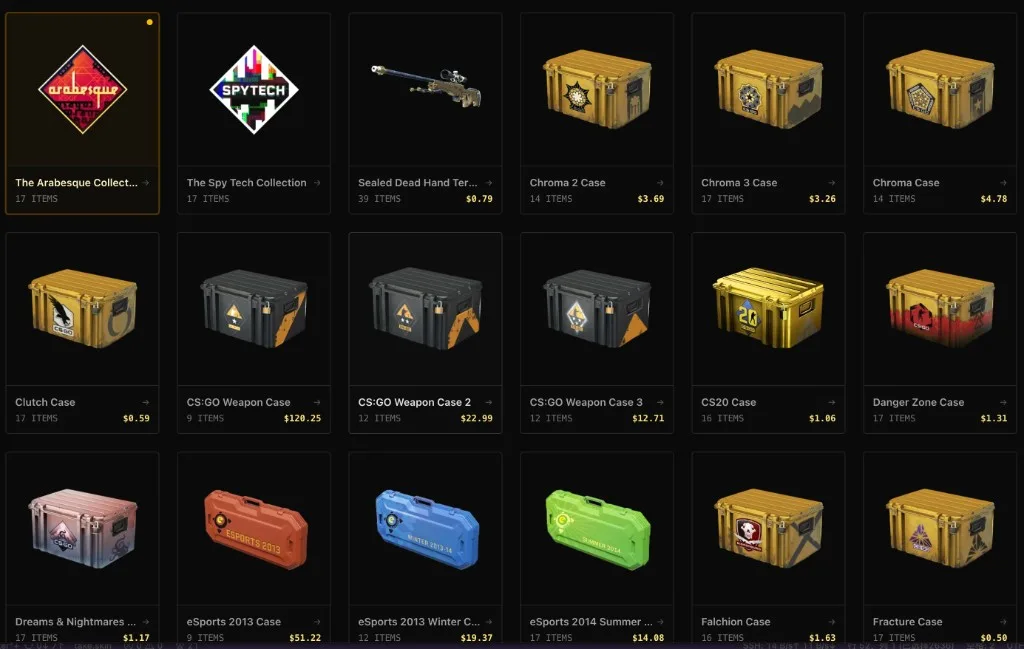
Active & modern cases
- Fever Case
- Gallery Case
- Kilowatt Case
- Revolution Case
- Recoil Case
- Dreams & Nightmares Case
- Fracture Case
- Snakebite Case
- Clutch Case
- Danger Zone Case
- Horizon Case
- Prisma Case / Prisma 2 Case
- Spectrum Case / Spectrum 2 Case
- CS20 Case
Operation & special cases
- Operation Bravo Case
- Operation Breakout Weapon Case
- Operation Phoenix Weapon Case
- Operation Vanguard Weapon Case
- Operation Wildfire Case
- Operation Hydra Case
- Operation Broken Fang Case
- Operation Riptide Case
- Shattered Web Case
- Winter Offensive Weapon Case
- Huntsman Weapon Case
- Revolver Case
- Shadow Case
- Falchion Case
- Glove Case
- Sealed Dead Hand Terminal
Chroma / Gamma / classic weapon cases
- Chroma Case / Chroma 2 Case / Chroma 3 Case
- Gamma Case / Gamma 2 Case
- CS:GO Weapon Case / CS:GO Weapon Case 2 / CS:GO Weapon Case 3
- eSports 2013 Case
- eSports 2013 Winter Case
- eSports 2014 Summer Case
Collections (non-case opens)
- The Arabesque Collection
- The Spy Tech Collection
That catalogue is why the simulator is useful as a research tool, not just a toy: you can compare a $0.16 Kilowatt open streak against a $120 original Weapon Case session without spending a cent.
Sandbox Mode vs Case Clicker
take.skin ships two play styles on the same official-odds engine:
| Mode | Best for | How it feels |
|---|---|---|
| Sandbox Mode | Testing a specific case, bulk opens, ROI math | Pick a case → Open / Bulk Open → read session stats |
| Case Clicker | The classic clicker loop people search for | Progress / clicker pacing layered on real unboxing |
Most sites force you into either a shallow idle clicker or a deposit-backed “unbox.” Here you get both: switch Sandbox Mode ↔ Case Clicker in one header toggle, keep the same rarity table, and never unlock a paywall.
If you arrived from searching “CS2 case clicker online”, start in Case Clicker for the game loop, then flip to Sandbox when you want clean bulk data on one box.
Per-Case ROI Data (Not Just Pretty Animations)
Official odds tell you how often each rarity appears. They do not tell you whether a given case is a terrible EV buy. take.skin layers market math on top:
- Case picker prices — each card shows the live case price used for spend calculations.
- Session stats — opened count, spent, rarity breakdown, reset anytime.
- Bulk opening results — after 50 / 200 / 300 opens, you get top drops, total value, profit/loss, and a rarity distribution bar.
- ROI calculator — open the ROI tool from the simulator header (
/simulator/roi) to compare cases by expected return, EV, and price instead of vibes.
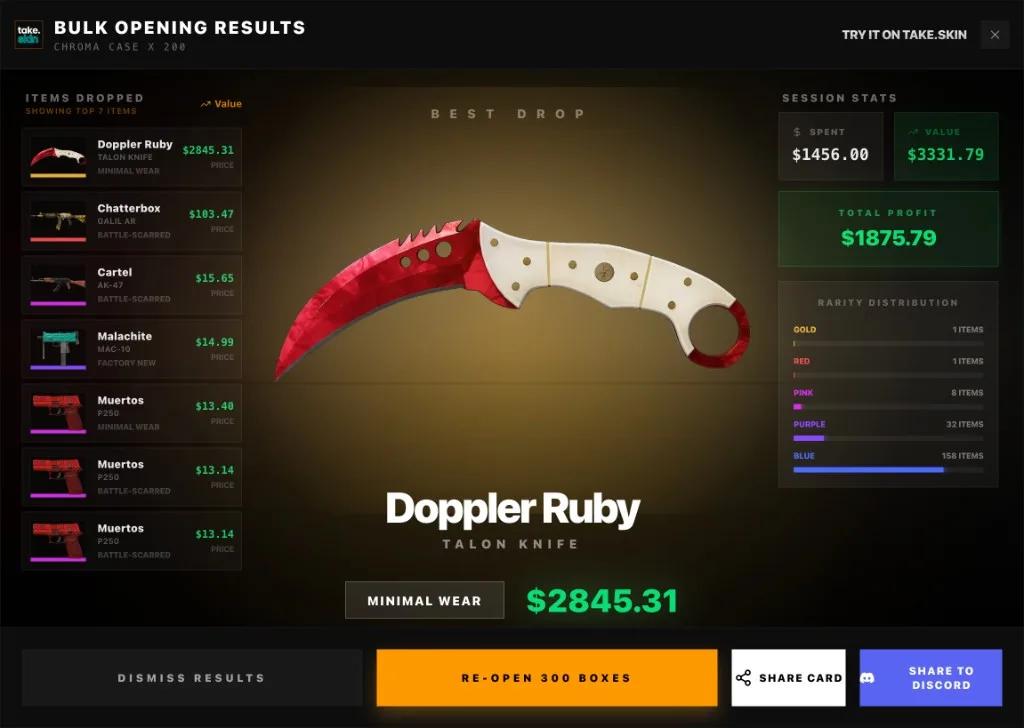
The screenshot above is a lucky 200× Chroma Case bulk run: gold + red in the mix, full rarity histogram, simulated spend vs market value, plus share cards for Discord. A dry run looks just as honest—most sessions finish red on profit, which is exactly what real Valve math predicts.
Official Odds, Zero Fees
Every open on take.skin follows the standard CS2 rarity ladder:
| Rarity | Color | Approx. rate |
|---|---|---|
| Mil-Spec | Blue | ~79.92% |
| Restricted | Purple | ~15.98% |
| Classified | Pink | ~3.2% |
| Covert | Red | ~0.64% |
| Rare Special | Gold | ~0.26% (~1 in 385) |
No deposit bonus. No “VIP luck.” No withdrawal cut—because there is nothing to withdraw. The product is the simulation: case library, clicker mode, ROI tooling, and enough daily volume that dry streaks and gold spikes both show up in the live counters.
How to Use It in Five Minutes
- Go to take.skin/simulator.
- Choose Sandbox Mode or Case Clicker.
- Open the case grid and pick any box from the list above.
- Run single opens or set a bulk quantity (e.g. 50 / 200).
- Read session + bulk ROI, then check
/simulator/roiif you want case-vs-case expected returns before you ever buy a real key.
That is the exclusive value: not another opaque clicker clone, but a free, official-odds CS2 unboxing lab with 40+ real cases, a true Case Clicker mode, and per-case ROI you can screenshot and share.