CS2 trade-up contracts are one of the few skin-economy systems where wear is fully deterministic — only which output skin you receive is random. Master the normalized float formula, and you can predict exact output wear before signing a contract. Pair that with collection probability math and live input pricing, and trade-ups become an optimization problem instead of blind gambling.
This guide covers the complete float framework as of August 2026, including the normalization system confirmed since the October 2024 Retakes Update, the October 2025 5-Covert → knife/glove contract expansion, and how to practice recipes free on take.skin's Trade-Up Calculator.
How Trade-Up Contracts Work
A standard contract consumes 10 skins of the same rarity (same StatTrak status) and returns 1 skin of the next-higher rarity. Two independent systems decide the result:
- Collection selection — the game randomly picks one of your 10 inputs (10% each), then randomly selects an output from that skin's collection at the next tier
- Float calculation — output wear is computed deterministically from all 10 input floats using normalized averaging
| Input rarity | Output rarity |
|---|---|
| Consumer Grade | Industrial Grade |
| Industrial Grade | Mil-Spec |
| Mil-Spec | Restricted |
| Restricted | Classified |
| Classified | Covert |
| Covert (red) | Knife/glove via 5-Covert contract (Oct 2025+) |
Hard rules: Souvenir and Contraband items cannot be used. StatTrak and non-StatTrak cannot mix. All 10 inputs must share the same rarity tier.
The Wear Formula: Relative Float Mapping
Many players assume output float is the raw average of 10 input floats. That is wrong.
Valve uses relative float mapping (normalization). Each skin has its own min/max float range. The game converts every input to a 0–1 percentage within that skin's range, averages those percentages, then maps the result onto the output skin's unique range.
Step 1 — Normalize each input
$$\text{Relative Float} = \frac{\text{Raw Float} - \text{Min Float}}{\text{Max Float} - \text{Min Float}}$$
Example: A skin with range 0.06–0.80 and raw float 0.20:
$$\frac{0.20 - 0.06}{0.80 - 0.06} = \frac{0.14}{0.74} \approx 0.1892 ;(18.92%)$$
That skin sits at 18.92% wear within its own spectrum (0% = best possible, 100% = worst).
Step 2 — Average all 10 normalized values
$$\text{Average Relative Float} = \frac{\sum_{i=1}^{10} \text{Relative Float}_i}{10}$$
Step 3 — Map onto the output skin's range
$$\text{Output Float} = \text{Output Min} + \text{Average Relative Float} \times (\text{Output Max} - \text{Output Min})$$
Example: Output skin range 0.00–0.50, average relative float 18.92%:
$$0.00 + 0.1892 \times 0.50 = 0.0946 ;\Rightarrow; \textbf{Minimal Wear}$$
Wear tier reference
| Wear | Float range |
|---|---|
| Factory New | 0.00 – 0.07 |
| Minimal Wear | 0.07 – 0.15 |
| Field-Tested | 0.15 – 0.38 |
| Well-Worn | 0.38 – 0.45 |
| Battle-Scarred | 0.45 – 1.00 |
Critical trap: A Factory New input with a capped range (e.g., P250 Supernova at 0.00–0.40, float 0.05) normalizes to 0.125, not 0.05. Ten such inputs produce Minimal Wear on a full 0.00–1.00 output — not Factory New. Always normalize before assuming wear.
The Filler Strategy
Because normalization stretches each skin to its own 0–1 scale, alchemists use fillers to control average wear cheaply:
- Buy 1–2 expensive inputs from your target collection
- Fill the remaining 8–9 slots with ultra-cheap, ultra-low-float skins from inexpensive collections
Those fillers pull the average normalized float toward 0%. If you hit your target collection (say, 20% chance with 2/10 inputs), the output maps to near-best wear — often Factory New — at a fraction of the cost of buying 10 premium inputs.
Worked example: Crafting a Factory New classified skin from Collection A where the output range is 0.00–0.70. You need average normalized float below ~0.10 for FN. Two Collection A inputs at 0.08 normalized + eight filler skins at 0.01 normalized gives:
$$(2 \times 0.08 + 8 \times 0.01) / 10 = 0.024$$
Mapped to 0.00–0.70 range → output float 0.0168 (Factory New). Collection hit rate is only 20%, but when it lands, wear is guaranteed pristine.
Outcome Probability Formula
For a specific output skin $S$ in collection $C$:
$$\text{Probability}(S) = \left(\frac{\text{Inputs from Collection } C}{10}\right) \times \left(\frac{1}{\text{Outputs at next tier in } C}\right)$$
Example — 5/5 Anubis + Revolution split (Restricted → Classified):
- 5 Restricted inputs from Anubis Collection (3 Classified outputs possible)
- 5 Restricted inputs from Revolution Case (3 Classified outputs possible)
Probability of a specific Anubis Classified (e.g., M4A4 | Eye of Horus):
$$\left(\frac{5}{10}\right) \times \left(\frac{1}{3}\right) = 16.67%$$
Total Anubis branch: 50%. Total Revolution branch: 50%. Within each branch, every classified skin has equal weight.
Expected Value (EV) and ROI
$$\text{EV} = \sum_j (\text{Probability}_j \times \text{Market Price}_j) - \text{Total Input Cost}$$
When EV > 0, the recipe is +EV over many attempts — not guaranteed profit on a single craft. Always subtract marketplace fees (Steam 15%, third-party 2–8%) and account for the 7-day Trade Protection hold on outputs.
| ROI threshold | Interpretation |
|---|---|
| < 100% | Negative EV — lose money on average |
| 100–110% | Break-even to slight edge before fees |
| > 110% | Strong candidate — verify live float-specific pricing |
Use float-searchable markets (CSFloat, Skinport) for input quotes. Calculator snapshots go stale within hours during volatile weeks.
Practice Free on take.skin
Our CS2 Trade-Up Calculator pulls live market prices, calculates EV, outcome probabilities, and predicted output floats. Click "Sign Contract! Simulate Once" to test a recipe before spending real balance.
Case Clicker + Collection Book (simulator mode)
Beyond the standalone calculator, take.skin's Case Clicker mode includes a Collection Book and integrated trade-up system:
| Feature | What it does |
|---|---|
| Case Clicker | Earn virtual coins, open real CS2 cases at official odds, upgrade click power |
| Collection Book | First-time unbox unlocks permanent entries; rarities grant passive coin multipliers (+0.1% white through +25% gold) |
| Trade-Up tab | Select duplicate skins to craft up; 10 same-rarity → next tier |
| 5-Covert rule | Simulator-only: 5 Covert skins → guaranteed knife/glove (official CS2 requires 5 Coverts from eligible collections since Oct 2025) |
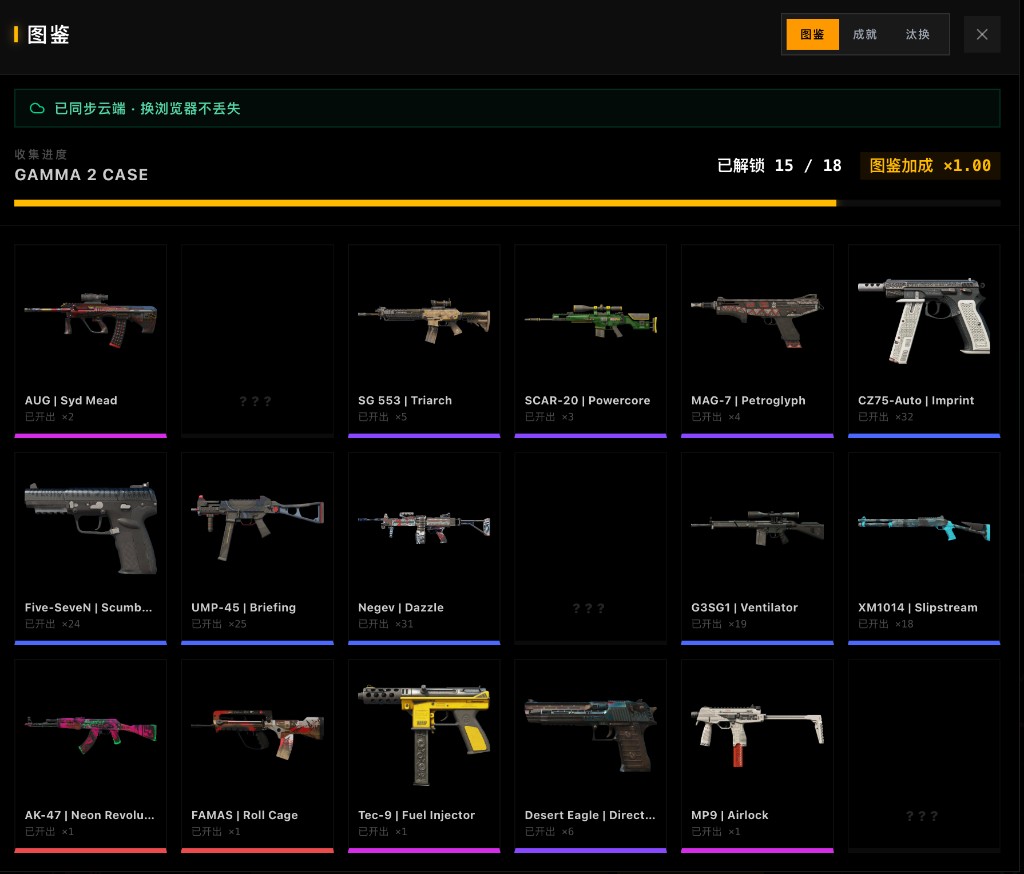
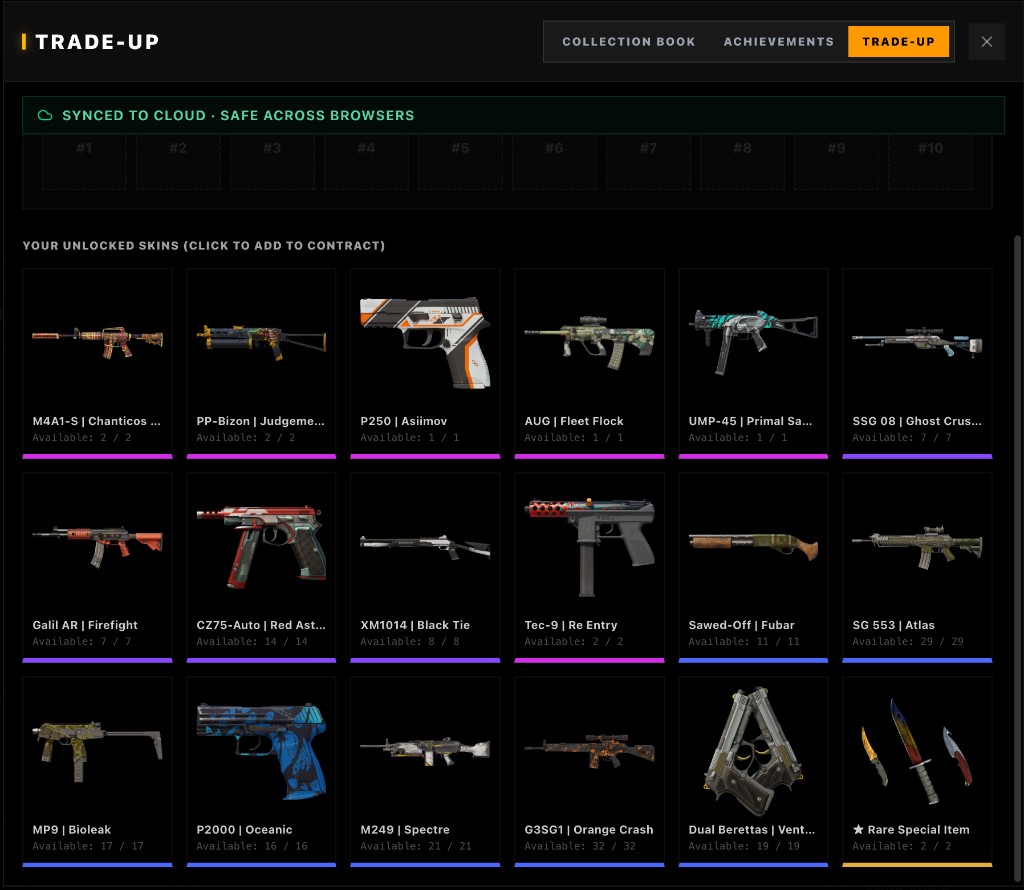
Switch between Sandbox Mode and Case Clicker in one header toggle — same official odds engine, zero deposit.
Step-by-Step: Finding a Profitable Recipe
- Open the Trade-Up Calculator
- Add planned inputs by collection and float
- Adjust float sliders — watch predicted output wear update in real time
- Check the Expected Earnings panel for ROI after live prices
- Simulate once to confirm animation and outcome distribution
- Buy inputs only after verifying float-specific listings match your model
Conclusion
The August 2026 CS2 economy rewards mathematical precision. Normalization explains why cheap fillers work, collection weighting explains why a 7/3 split beats accidental 5/5, and EV math separates +EV crafts from expensive mistakes.
Ready to test a recipe? Head to the CS2 Trade-Up Calculator and run the numbers before you sign your next contract.